Your Second Brain, Supercharged: Obsidian + Claude Code
You read something valuable. You save it. Three months later, you can't find it, or worse, you forget it existed. Most note-taking systems are just digital graveyards.
The Second Brain philosophy, popularised by Tiago Forte, offers a better model: a personal knowledge management system designed not just to store information, but to actively serve your work and thinking. For a deeper walkthrough of what a Second Brain is and how to build one, read How to Organise Your Life.
But even a well-organized vault has friction: searching, linking ideas, writing up notes, surfacing the right knowledge at the right time. What if an AI lived inside your vault and did that work with you? That's exactly what happens when you pair Obsidian with Claude Code.
// What Is a Second Brain?
A Second Brain is a digital commonplace book: a single, searchable repository for notes, ideas, research, and insights.
"Your brain is for having ideas, not for holding them." - David Allen
The core workflow is the CODE framework: Capture what resonates, Organize by actionability (not by source), Distill down to the essence, and Express by creating something with it. The goal is never to hoard knowledge, it's to think and build more effectively.
This is more than a personal productivity hack. AI researcher Andrej Karpathy, co-founder of OpenAI and former AI lead at Tesla, proposed a nearly identical pattern for building knowledge systems with LLMs. He describes a three-layer architecture: raw sources (documents you feed in), a wiki (LLM-maintained markdown files that grow richer with every new source), and a schema (instructions that define how the AI should structure and maintain the knowledge). The core operations (ingest new material, query what you know, lint for gaps and contradictions) map almost exactly onto how a Second Brain should work. When someone like Karpathy is converging on the same pattern independently, it's a signal the idea is structurally sound.
// The Tools: Obsidian and Claude Code
Two pieces of software. Zero subscriptions beyond Claude Pro. Everything local.
1. Obsidian: Your Local Knowledge Graph
Obsidian is a local-first Markdown editor built around bidirectional linking. Every note lives as a plain .md file on your disk, with no proprietary format, no cloud lock-in. Its graph view visualises how your ideas connect, and its plugin ecosystem (Dataview, Templater, Tasks, and more) turns a flat folder of notes into a structured, queryable knowledge base.
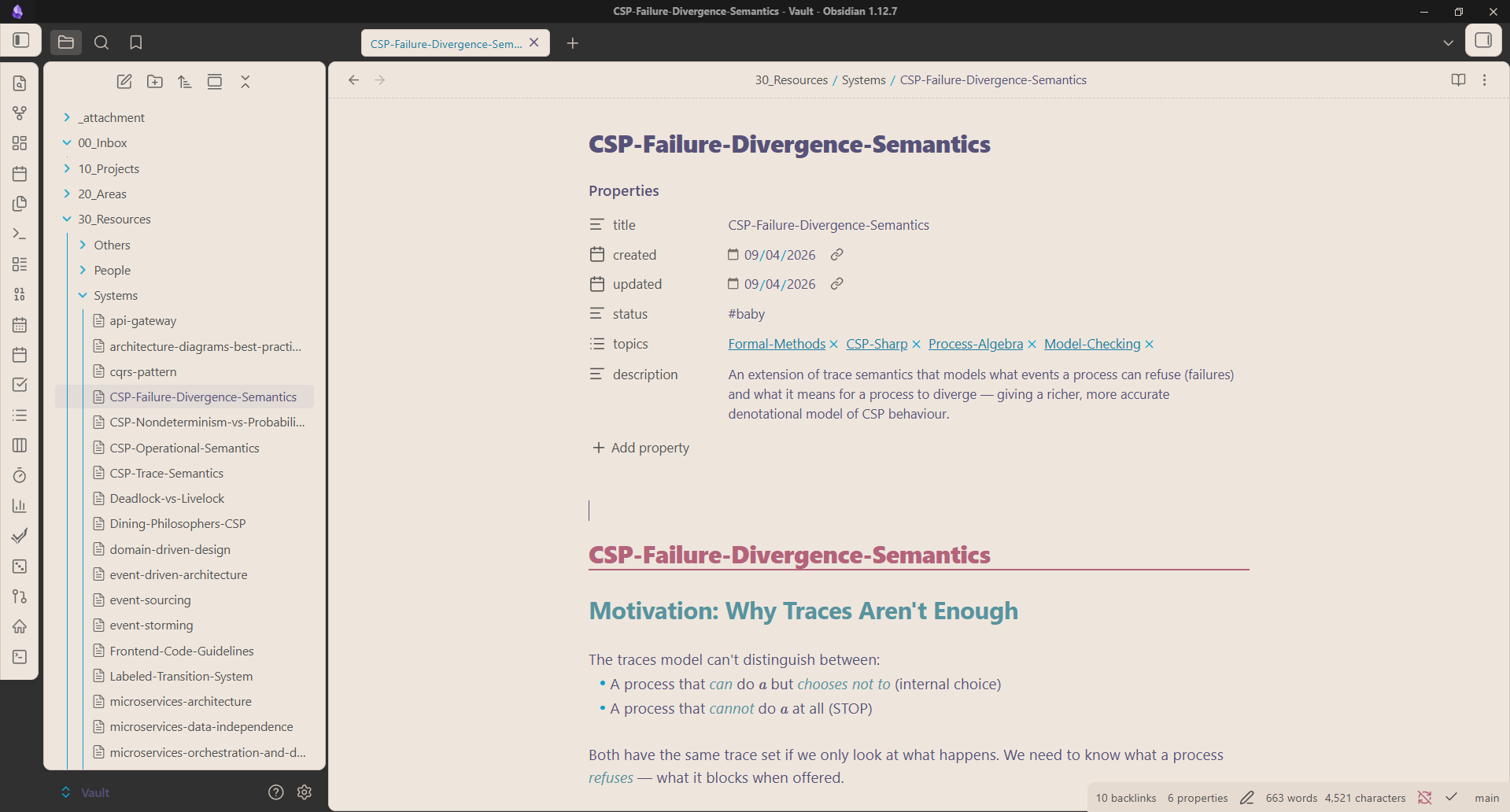
Every note you see in that sidebar is a single atomic concept: one idea, one file. The left panel shows the PARA folder structure; the right shows a fully formatted note with frontmatter, wikilinks, and topic tags. This is what a vault looks like after a few months of consistent capture.
But the real picture of a growing Second Brain isn't a file list, it's the graph. Every node is a note. Every edge is a wikilink. Watch what happens as knowledge accumulates:
Each new note you add doesn't just sit in a folder, it connects. A note on distributed systems links to your notes on databases, networking, and system design. A note from a lecture links back to a research paper you ingested last semester. Over time the graph stops looking sparse and starts looking like a web of understanding, your understanding, built up one capture at a time. This is what compound knowledge looks like.
Notes siloed by folder. No links between ideas. Export is painful. Your knowledge is trapped in someone else's format.
Every note links to related ideas. Plain Markdown files you own forever. Graph view reveals how your thinking connects over time.
2. Claude Code: AI That Reads Your Vault
Claude Code is Anthropic's agentic CLI, an AI that can read, write, and reason across your entire codebase or, in this case, your entire vault. Unlike a chatbot you paste notes into, Claude Code runs inside your vault directory. It can read files, follow wikilinks, search for patterns, write new notes in your exact format, and update indexes, all through natural language commands.
You manually copy notes into a chat window. The AI has no memory of your vault's structure. Output needs manual re-formatting and filing.
Claude reads your actual files. It understands your folder structure, your templates, your tagging system. Output lands directly in the right place.
3. Together: A Thinking Partner, Not Just a Storage System
The combination is greater than the sum of its parts. Obsidian provides the structure and permanence; Claude Code provides the intelligence and velocity. You capture raw ideas into an inbox, and Claude processes, links, and files them into atomic notes, following your exact conventions. You ask a question, and Claude navigates the vault graph to synthesize an answer from your own knowledge, not from generic internet data.
You manually process every inbox note. Linking ideas requires remembering what you've already written. Your vault grows but feels harder to use over time.
Claude processes inbox notes into atomic notes in seconds. It surfaces relevant existing notes and adds wikilinks automatically. Your vault compounds in value as it grows.
// How They Work Together: Real Examples
Here are three concrete workflows that show the combination in practice.
The workflow: Paste a raw article, lecture notes, or a PDF into 00_Inbox/. Run /organize in Claude Code. Claude reads the source, extracts key concepts, writes atomic notes in 30_Resources/ using your frontmatter template, adds wikilinks to related notes, and updates the topic index, all in one pass.
The workflow: Ask Claude "what do I know about distributed consensus?" It reads the topic index, navigates to relevant notes, follows wikilinks one hop deep, and synthesizes a cited answer, sourced entirely from your vault. You can then file that synthesis back as a new atomic note.
The workflow: You're writing a blog post or preparing for an interview. Tell Claude the project context. It scans your vault for relevant atomic notes, assembles a project brief in 10_Projects/, and flags knowledge gaps you should fill. When you sit down to write, 80% of the research is already done.
The compound effect here mirrors the Second Brain's Slow Burn principle: you're constantly feeding your vault with small captures, and Claude ensures every capture is processed, linked, and ready to use when a project demands it.
// Benefits: Why This Combination Works
The Second Brain's CODE framework maps directly onto what Obsidian + Claude Code delivers:
- Capture: Obsidian's inbox gives you a zero-friction landing zone. Nothing is lost.
- Organize: Claude processes raw notes into PARA-structured atomic notes automatically, following your exact template and tagging system.
- Distill: Claude's synthesis queries surface the essence of what you know, on demand, cited from your own notes.
- Express: Claude helps draft blogs, summaries, and project briefs directly from your vault's accumulated knowledge.
The result is a system where your knowledge compounds. Every note you add makes the vault more valuable. Every query Claude runs teaches you what you already know but haven't connected yet.
// Applications for Everyone
Everyone is a learner. Whether you're a student, a working professional, a creator, or someone simply trying to think more clearly, this combination meets you where you are.
Academic study: After every lecture, drop your rough notes into the inbox. Claude processes them into atomic notes, links them to prior concepts, and flags contradictions with what you already know. Over a semester, your vault becomes a connected map of the entire subject, not a pile of lecture slides.
Professional growth: Lessons from meetings, feedback from managers, industry insights from articles, all captured, organized, and queryable. Ask Claude to surface what you know before a big presentation, a career conversation, or a role change.
Technical skill-building: Learning a new framework, tool, or domain? Every time you solve a problem or read a doc, capture it. Claude organizes your learnings into permanent notes. Before a project or interview, query the vault, your past self has already done the research.
Writing and communication: Blogs, reports, proposals, cover letters: Claude can draft these by pulling from your vault's existing notes. Your writing becomes faster and more original because it's grounded in your thinking, not generic templates.
// How I Use It
Here's what the actual setup looks like for me, a CS student building toward a full-time engineering career.
The Folder Structure
My vault follows a PARA-inspired layout, adapted for a knowledge base rather than a task manager:
Vault/
├── 00_Inbox/        ← Raw notes, clips, PDFs, the landing zone
├── 10_Projects/     ← Active work; one folder per project with a LOG.md
├── 20_Areas/        ← Daily notes, career planning, ongoing responsibilities
├── 30_Resources/    ← Permanent atomic notes; one concept per file
│   ├── Systems/     ← Technical knowledge: architecture, code, CS concepts
│   ├── People/      ← Career, leadership, communication, soft skills
│   └── Others/      ← Everything else: health, finance, hobbies
├── 40_Archive/      ← Completed projects, old semesters, processed sources
└── 50_Topics/       ← Tag index; Claude uses this to navigate the graph
Everything in 30_Resources/ is a single atomic note: one concept, one file. No subfolders. No giant documents. This flat structure is what makes Claude's navigation reliable: it reads the topic index, follows the right tag, finds the notes, and traverses wikilinks one hop at a time.
The Four Commands I Use Daily
These are custom slash commands wired into Claude Code via my CLAUDE.md, instructions that tell Claude exactly how to behave inside the vault.
/organize: Process raw inbox notes into atomic notes. I drop a rough capture into 00_Inbox/, run /organize, and Claude extracts key concepts, writes properly formatted atomic notes into 30_Resources/, adds wikilinks to related notes, and updates the topic index. What would take me 20 minutes manually takes Claude about 30 seconds.
/ingest: Integrate an external source (article, paper, web clip) into the vault. Claude writes a source-summary note to 40_Archive/Research/, updates existing atomic notes with new information, and flags any contradictions with what the vault already knows. This is the Karpathy "ingest" operation applied to my personal knowledge base.
/query: Ask a question and get an answer sourced entirely from my own notes. Claude navigates the topic index, reads relevant atomic notes, follows wikilinks, and synthesizes a cited response. I use this before interviews, before writing, and whenever I want to know what I actually know about a topic, not what the internet says.
/lint: Health-check the vault. Claude scans for orphaned notes with no inbound links, topic tags that reference missing files, frontmatter inconsistencies, and duplicate concepts. It surfaces a triage table and asks which issues to fix. This keeps the vault from decaying into a mess over time.
The Obsidian Web Clipper + /ingest Workflow
One of the most useful capture workflows starts in the browser. The Obsidian Web Clipper is a browser extension that lets you clip any web page, say an article, a documentation page, a blog post, or a research paper, directly into your vault's inbox as a clean Markdown file. One click, no copy-pasting.
From there, I run /ingest in Claude Code. Claude reads the clipped article, extracts the key ideas, cross-references them against my existing atomic notes, writes a source summary into 40_Archive/Research/, and updates any relevant notes in 30_Resources/ with the new information and a backlink to the source. The clip goes from browser → inbox → integrated knowledge in under a minute.
This is the full capture-to-integration pipeline: Web Clipper captures it, /ingest makes it permanent.
// Quick Guide: Set It Up Yourself
Getting this running takes about 15 minutes. Here's exactly how.
Step 1: Download the tools
- Obsidian: obsidian.md, free download, available on Windows, Mac, Linux, iOS, and Android.
- Claude Code: claude.ai/code, requires a Claude Pro subscription. Install it via npm:
npm install -g @anthropic-ai/claude-code
Step 2: Create your vault
Open Obsidian. You'll be greeted with this screen:
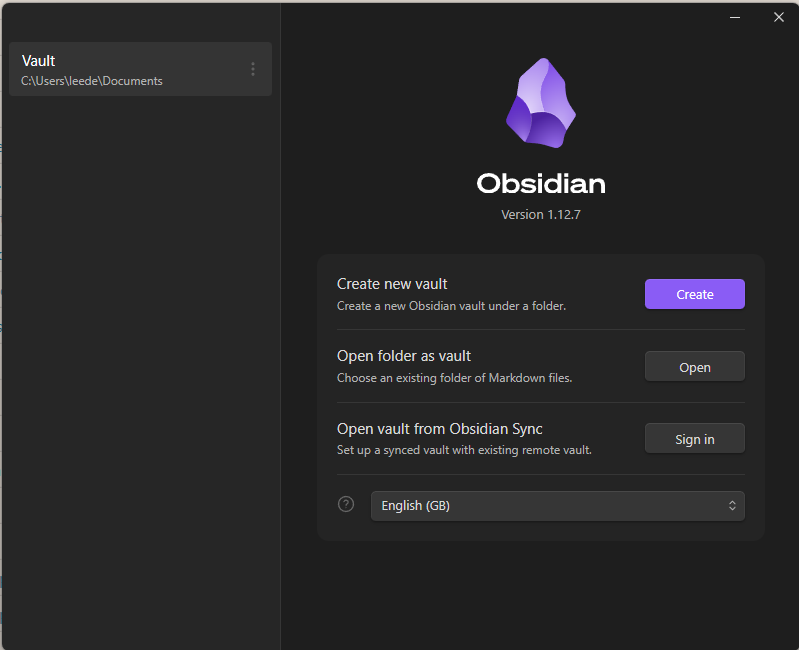
Click Create new vault, give it a name, and pick a location on your local disk. Inside, create the folder structure that matches how you want to organise your knowledge, or start with the PARA layout above (00_Inbox, 10_Projects, 20_Areas, 30_Resources, 40_Archive). Once set up, your vault will look something like this: a clean sidebar of folders and atomic notes, ready to fill:
Step 3: Open your terminal in the vault
Navigate to your vault folder in a terminal and run claude to launch Claude Code:
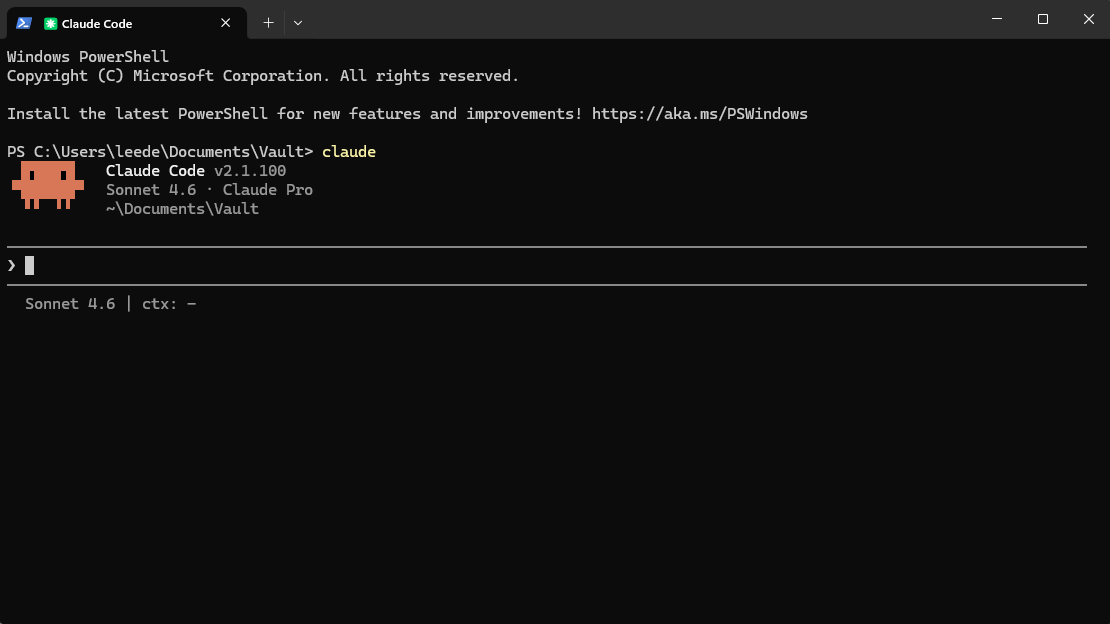
Claude Code starts at ~/Documents/Vault, your vault directory, with full read/write access to every file inside. This is the connection point between your knowledge base and the AI.
Step 4: Give Claude its instructions via the Karpathy pattern
This is the key step. Andrej Karpathy's LLM wiki gist describes the exact pattern we're implementing: raw sources, a maintained wiki, and a schema document that tells the LLM how to behave. Open the gist, copy the full content, and paste it into Claude Code with a message like:
"I want to implement this pattern in my Obsidian vault. Here's the gist, please read it and help me set up a CLAUDE.md file that wires up ingest, query, and lint as slash commands for my vault structure."
Claude will read the pattern and scaffold the instructions for your specific setup.
Tip: Before Claude writes anything, tell it how you plan to use the vault. Are you a student tracking lecture notes? A developer capturing technical learnings? A writer building a research library? The more context you give, the better Claude will tailor the
CLAUDE.mdinstructions, the schema that governs everything. A good schema is the difference between a generic note-taker and a Second Brain that actually thinks like you.
// Final Thoughts
Most people treat their notes as a filing cabinet, things go in, rarely come out. The Second Brain flips this: knowledge is meant to circulate, to compound, to produce. Obsidian gives you the structure to make that happen. Claude Code gives you the intelligence to make it effortless.
The deeper shift isn't about productivity tools, it's about your relationship with your own thinking. When your vault is well-organized and AI-navigable, you stop feeling buried under information and start feeling like you actually know things. The right idea surfaces at the right time.
Build a vault that thinks with you, not just a place where thoughts go to die.
References & Further Reading
- Second Brain Overview: How to Organise Your Life
- Core Book: Building a Second Brain by Tiago Forte
- Karpathy's LLM Wiki Pattern: gist.github.com/karpathy
- Ali Abdaal: How to Organise Your Life - Building a Second Brain
Tools & Apps
- Obsidian: obsidian.md
- Obsidian Web Clipper: obsidian.md/clipper
- Claude Code: claude.ai/code
Channels & Inspiration
- Tiago Forte: Forte Labs
- Andrej Karpathy: karpathy.ai
- Ali Abdaal: aliabdaal.com